• About
  • Contact
  • Privacy Policy
SecurityCamCenter.com
  • Home
  • Buying Guide
  • Learning & Tips
  • Technical Guides
  • Security Tips
  • Downloads
  • CCTV Glossary
No Result
View All Result
SecurityCamCenter.com
No Result
View All Result
Home Technical How To Fix

Reset password generator for Hisilicon DVR (2026 version)

Marco Albertini by Marco Albertini
in How To Fix

In this article, we will show how to reset the forgotten password for Hisilicon DVR and NVR by using a super password generator software. Follow the steps one by one.

This reset method works for Hisilicon based DVR/NVR, including recorders that use Hi3520, Hi3520D, Hi3521A, Hi3521D, Hi3531, Hi3535, Hi3536 chips. The “Superpassword” tool will generate a temporary password that works for one hour only.

Download the Super password tool

• Hisilicon DVR Password generation 01
• Hisilicon DVR Password generation 02
• Hisilicon DVR Password generation 03

There are three versions of the super password generator, you need to try all of them and see which one works for your recorder. Superpassword tool is an executable file, compatible with Windows 32/64 bit OS.

After you have downloaded the file, double click .exe file can run immediately, installation is not required (it’s a portable software).

Based on the internal algorithm, the tool can calculate a reset password for your Hisilicon recorder after entering the date and time (of the DVR/NVR).

How to use the Hisilicon Super Password tool?

Step 1. Connect your Hisilicon DVR (or NVR) to your monitor/TV and write down the current date and time displayed on the monitor.

Step 2. Double click “Superpassword.exe” executable file (after you have downloaded it beforehand).

Step 3. Select the date and time from the calendar to match your DVR/NVR’s date and time.
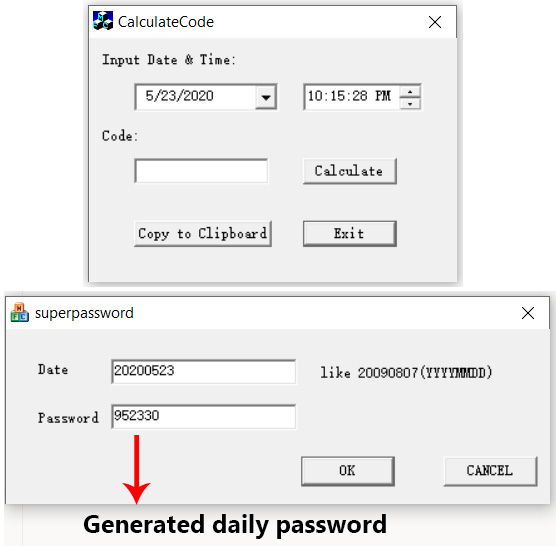
Hisilicon Password GeneratorStep 4. Click “Do it” to generate a temporary password.

Step 5. Using your mouse to operate the DVR/NVR, enter the username “admin”, then enter the temporary super password. Now you’ll be able to access your Hisilicion DVR. Modify the password and create a new one.

If you still cannot reset, then refer to this guide for other reset options: How to Reset H.264 DVR (lost password).


Marco Albertini

Marco Albertini

Italian-born Marco Albertini, with a background in Computer Science, found his passion in security camera systems, alarms, and cloud services. Based in New York since 2010, he's a sought-after expert, assisting numerous businesses and homeowners in securing their properties with advanced solutions.

Related Posts

How to Prevent IR Reflection in Security Cameras

How to Prevent IR Reflection in Security Cameras

Hanwha Error 403 Forbidden in Chrome (Solution)

How to Fix Hanwha Replacement Recommended Error for the SSD

Ring Technical Support

How to reset Ring Stick-Up Camera (2026 Methods)

How to use BNC Twist-On Connectors (in Camera Systems)

How to use BNC Twist-On Connectors (in Camera Systems)

How to create an App Password for your Gmail account (that can be used by Security Systems to send email notifications)

How to create an App Password for your Gmail account (that can be used by Security Systems to send email notifications)

Hanwha Error 403 Forbidden in Chrome (Solution)

Reset the password on Hanwha NVR

Load More

Comments 2

  1. David Poyner says:
    5 years ago

    Hello, my generic “H.264 Network DVR” has the Hi3520 chip and although I don’t know the admin password, it hints that it’s the default, which I also don’t know. I’ve used the 1st password generator semi-successfully, in that it then shows the following message:

    “Login with super password, restore password by default”

    When I click the “OK” button, the DVR reboots and I’m back to the same situation. It appears that the default password has been set; however, I don’t know what it is!! I’ve tried 12345, 123456, admin etc etc. Please help!

    Reply
  2. Edgar says:
    3 years ago

    You should try to remove the inside battery for 12 hours.

    Reply

Leave a Reply Cancel reply

Your email address will not be published. Required fields are marked *

Latest articles

Learning & Tips

Will a Laser Pointer Damage a Security Camera?

How To Fix

How to Prevent IR Reflection in Security Cameras

Smoke Detectors

Smoke Detector Beeps Twice and Stops – How to Fix It (2026)

Hikvision

How to Set Up Hikvision Smart Hybrid Light Cameras

Hikvision

How to Configure Motion Detection via iVMS-4200 Software

SecurityCamCenter is a participant in the Amazon Services LLC Associates Program. This post may contain affiliate link(s). An affiliate link means we may earn advertising or referral fees if you make a purchase through our links, at no extra cost to you.

Categories

© 2024 SecurityCamCenter.com / Security Tips and Tutorials

No Result
View All Result
  • Home
  • Buying Guide
  • Technical

© 2024 SecurityCamCenter.com / Security Tips and Lessons