• About
  • Contact
  • Privacy Policy
SecurityCamCenter.com
  • Home
  • Buying Guide
  • Learning & Tips
  • Technical Guides
  • Security Tips
  • Downloads
  • CCTV Glossary
No Result
View All Result
SecurityCamCenter.com
No Result
View All Result
Home Technical Wyze

Wyze has no sound in recordings

Marco Albertini by Marco Albertini
in Wyze

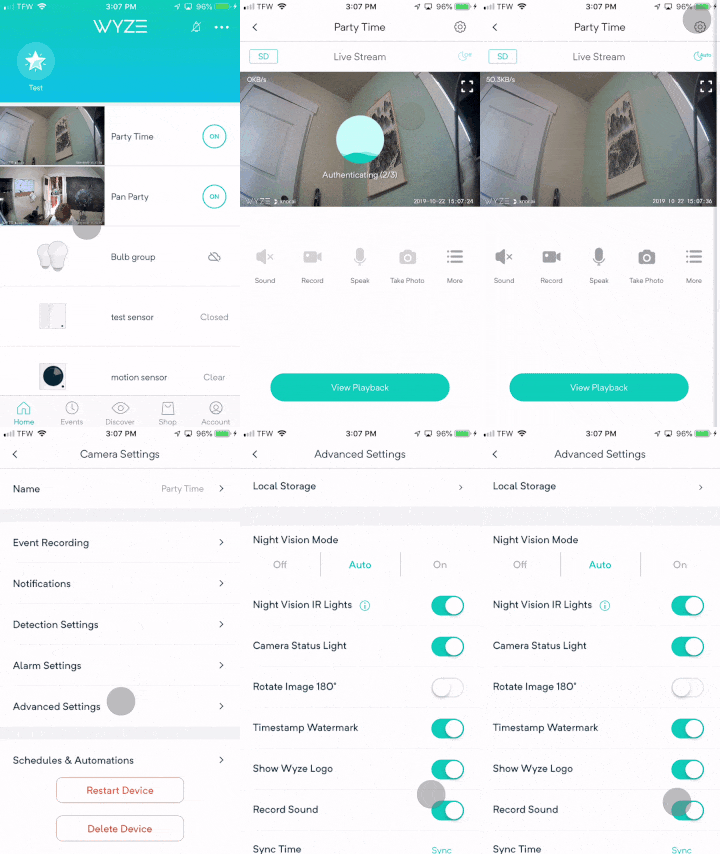
If you’re using Wyze camera but you’re not able to hear sound in your recordings, try making sure that Record Sound is turned on by following these steps:
Step 1. Enter the Live Stream for the camera in question.
Step 2. Tap on the Settings gear icon in the top right corner and navigate to Advanced Settings.
Step 3. If the Record sound option is toggled on, tap to toggle off.
Step 4. If the Record sound option is toggled off, toggle the switch on and back off.
Step 5. If there is still no sound on the recordings, please perform a factory reset on the camera and re-setup the camera.

Marco Albertini

Marco Albertini

Italian-born Marco Albertini, with a background in Computer Science, found his passion in security camera systems, alarms, and cloud services. Based in New York since 2010, he's a sought-after expert, assisting numerous businesses and homeowners in securing their properties with advanced solutions.

Related Posts

How-to Wyze Cam

Wyze Error Code 68 (Quick Fix)

How-to Wyze Cam

Wyze Cam Error Code 27 (Quick Fix)

How-to Wyze Cam

How to Connect Wyze Smart Plug to WiFi

How-to Wyze Cam

Fix: Wyze Lock Keeps Jamming

How-to Wyze Cam

Wyze Camera Error Code 6 (quick fix)

How-to Wyze Cam

Wyze Error Code 7 (quick fix)

Load More

Leave a Reply Cancel reply

Your email address will not be published. Required fields are marked *

Latest articles

Learning & Tips

Will a Laser Pointer Damage a Security Camera?

How To Fix

How to Prevent IR Reflection in Security Cameras

Smoke Detectors

Smoke Detector Beeps Twice and Stops – How to Fix It (2026)

Hikvision

How to Set Up Hikvision Smart Hybrid Light Cameras

Hikvision

How to Configure Motion Detection via iVMS-4200 Software

SecurityCamCenter is a participant in the Amazon Services LLC Associates Program. This post may contain affiliate link(s). An affiliate link means we may earn advertising or referral fees if you make a purchase through our links, at no extra cost to you.

Categories

© 2024 SecurityCamCenter.com / Security Tips and Tutorials

No Result
View All Result
  • Home
  • Buying Guide
  • Technical

© 2024 SecurityCamCenter.com / Security Tips and Lessons